בחזרה לבלוג←
לינקדאין סוף סוף נלחמת ב-AI slop. ואתם עלולים לחטוף בדרך
חניתה יודובסקי


הכפתור מאמן מודלים. המסנן האוטומטי מוריד את החשיפה. שני דברים שונים שכולם מערבבים.
אמל"ק: ב-30 ביולי 2026 לינקדאין הוסיפה בתפריט שלוש הנקודות אפשרות לסמן ״Seems like AI slop״, בהודעה של מנהל המוצר הראשי כתוב שהיא חלה על פוסטים ועל תגובות, וצילום מסך בפוסט שלו מראה את זה כבר עובד. אבל הדיווח שלכם לא מוריד חשיפה לאף אחד. הוא מאמן מודלים. מה שמוריד חשיפה זה מסנן אוטומטי נפרד (classifier), והוא פוגע רק בהגעה מחוץ לרשת שלכם. במקביל לינקדאין מוחקת את כלי הכתיבה שלה עצמה מתיבת הפוסט. הרקע: מחקר של Pangram מיולי 2026 מצא ש-40.5% מהפוסטים הארוכים בלינקדאין נכתבו לגמרי על ידי AI. ומשהו שלא מדברים עליו בכלל: מחקר של סטנפורד בדק שבעה גלאי AI על חיבורים שכתבו בני אדם, ומצא שכשהאנגלית אינה שפת האם של הכותב, הגלאים מסמנים אותו בטעות כמכונה ב-61.3% מהמקרים. בפנים: מה המהלך הזה עושה לחשיפה שלכם, ומה כדאי לשנות השבוע.
יש לי הרגל לקרוא את המקור לפני שאני קוראת את הפרשנות. השבוע זה השתלם.
הפיד מלא בפוסטים על הכפתור החדש של לינקדאין, ורובם מספרים אותו סיפור: תדווחו על פוסט, החשיפה שלו תרד. ישבתי עם הפוסט של הרי סריניוואסן (Hari Srinivasan), מנהל המוצר הראשי של לינקדאין, ושם כתוב משהו אחר. הדיווחים והחשיפה הם שני מנגנונים נפרדים שרצים במקביל, ורק אחד מהם נוגע לחשיפה שלכם.
שניהם הוכרזו באותו פוסט, בשני משפטים נפרדים.
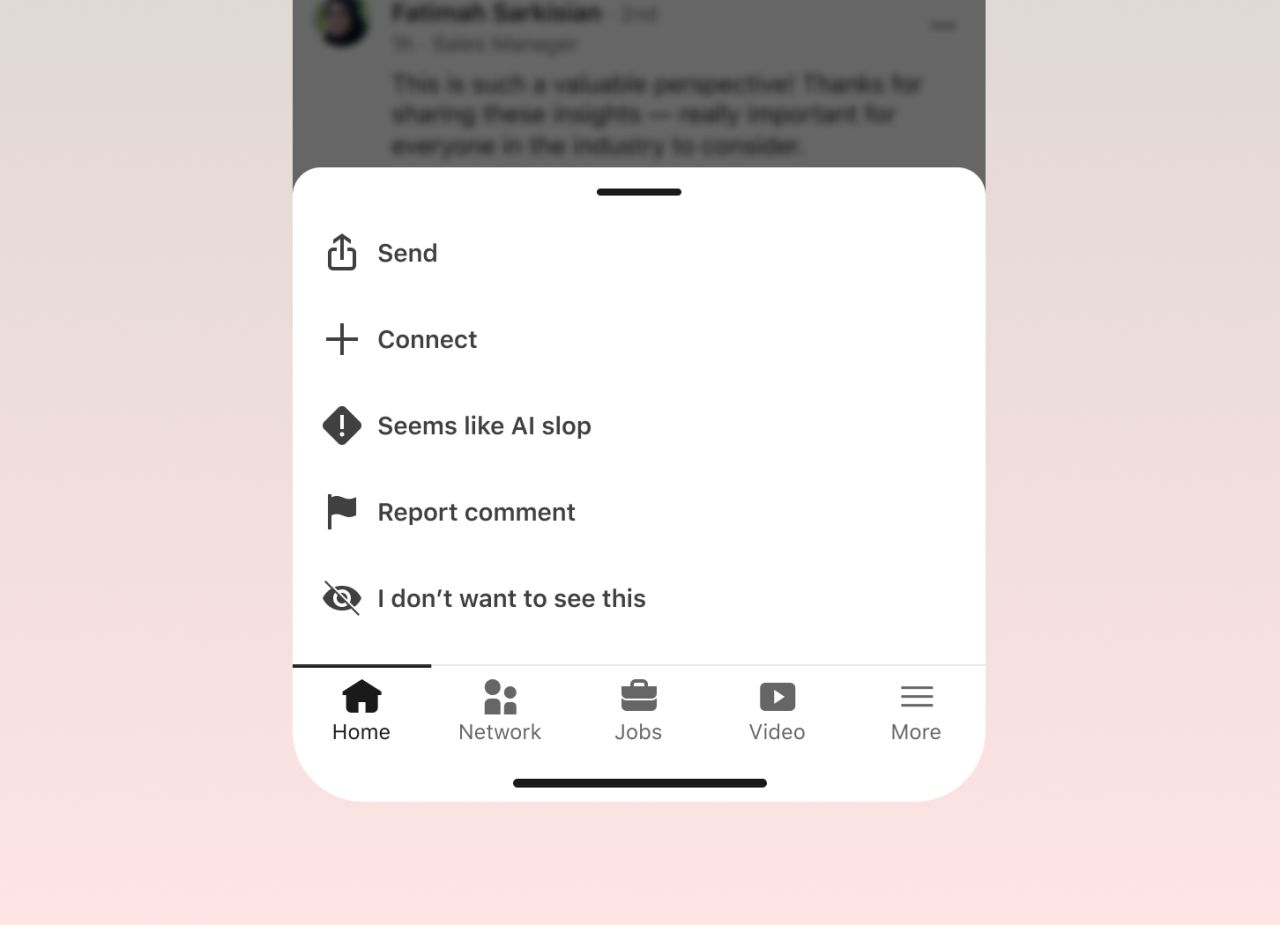
(מתוך הפוסט של Hari Srinivasan)
1. מה בדיוק קורה כשלוחצים על הכפתור
הכפתור יושב בתפריט שלוש הנקודות של הפוסט, בין ״Not interested״ ל-״Report post״, ורשום עליו ״Seems like AI slop״ לצד אייקון של סימן קריאה. לפי דיווחי Forbes ו-The Register, לחיצה מסתירה את הפוסט מהפיד שלכם ומחזירה הודעת תודה.
בתגובות זה נראה אחרת. באחד מצילומי המסך שסריניוואסן צירף לפוסט שלו, תפריט התגובה נפתח במובייל כחלונית מלמטה ובה חמש שורות: Send, Connect, ואז ״Seems like AI slop״, ומתחתיה Report comment ו-I don't want to see this. התגובה שמעליה נפתח התפריט היא ״This is such a valuable perspective! Thanks for sharing these insights״, וקשה לחשוב על דוגמה מדויקת יותר לתגובה שהכפתור הזה נועד לה.

זה עדיין לא אומר שזה כבר אצלכם. אצלי האפשרות הזאת לא הופיעה על תגובות, וזה מתיישב עם המילה ״ramping״ שסריניוואסן בחר.
הניסוח המדויק של סריניוואסן:
״We are ramping the ability for members to tell us if they believe a post or comment seems like AI slop. Slop is hard to define and the definition changes; this lets us tune our models and make better feeds.״
שני דברים במשפט הזה כמעט לא צוטטו בסיקור.
הראשונה, גם תגובות. ״a post or comment״ כתוב אצלו במפורש, והצילום שהוא צירף מראה את זה עובד. רוב מי שכתב על זה בפיד הציג את החלת הפיצ׳ר על תגובות כתחזית לעתיד.
השנייה, למה בכלל בני אדם ולא רק אלגוריתם. סריניוואסן מסביר שההגדרה של slop משתנה כל הזמן, ולכן אין להם חוק קבוע לקודד. הם צריכים תיוג אנושי מתמשך כדי לעדכן את המודלים. הוא גם מוסיף משפט שכדאי לזכור: ״AI and slop are not the same thing; many people refine thoughts with AI״.
מה לעשות עכשיו: לפני שאתם מסמנים משהו, שאלו אם הפריע לכם התוכן או האלגוריתם שכתב אותו. הכפתור נועד לתוכן חלול, לא לכל מי שהשתמש ב-AI בדרך.
2. הדיווח שלכם לא מוריד חשיפה לאף אחד
כאן כמעט כל מי שכתב על זה בפיד טעה.
בפוסט של סריניוואסן יש שתי הכרזות נפרדות. האחת, הכפתור, שהפלט שלו הוא סיגנל לאימון המודלים (״this lets us tune our models״). השנייה, משפט אחר לגמרי:
״We are ramping up a series of new and improved classifiers that identify if a post is AI-slop or generally low-quality content. This will reduce the amount of AI slop you might see in suggested content and content from outside your network.״
מסנן אוטומטי (classifier), כלומר מודל שסורק כל פוסט ומדביק לו תווית ״זה slop״ או ״זה בסדר״, בלי שאף אדם מעורב. הדיווחים של המשתמשים לא מופיעים במשפט הזה בכלל. והפגיעה מוגדרת בצמצום: תוכן מוצע והגעה מחוץ לרשת שלכם (out-of-network reach). בשום מקום, לא אצלו ולא בסיקור, לא נאמר שהחשיפה לעוקבים ולקשרים שלכם נפגעת.
זה מסתדר ישר עם המבצע שלינקדאין הכריזה עליו כבר במאי, כשלורה לורנצטי (Laura Lorenzetti), סמנכ״לית התוכן העולמית, פרסמה שהם מצמצמים חשיפה לתוכן AI גנרי ומדווחת על 94% דיוק בבדיקות המוקדמות של המסנן.
ההגעה מחוץ לרשת היא הפעמים שבהן לינקדאין מציגה את הפוסט שלכם למישהו שלא עוקב אחריכם ולא מכיר אתכם, בתוך הפיד שלו, כהמלצה. ככה מגיעים עוקבים חדשים, וככה מגיעים לידים.
הפוסט עולה ← המסנן סורק אותו ← אם הוא מסומן כ-slop, לינקדאין מפסיקה להציג אותו לאנשים שלא מכירים אתכם ← הקשרים והעוקבים שלכם ממשיכים לראות הכל ← מספר החשיפות בדאשבורד נשאר דומה, וזרם האנשים החדשים נסגר
וזו הבעיה. הפוסט לא נראה כמו כישלון. יש עליו לייקים, יש תגובות, יש חשיפות. הוא פשוט מפסיק להביא אנשים שלא הכרתם, ולזה אין שורה נפרדת בדאשבורד.
מה לעשות עכשיו: בניתוחים של הפוסט תחפשו את הפילוח בין עוקבים ללא-עוקבים, ותשוו בין החודשיים האחרונים. אם לינקדאין לא מציגה לכם את הפילוח הזה, המדד החלופי הוא כמה עוקבים חדשים נוספו לכם בשבוע. ירידה שם, בזמן שהחשיפות והתגובות יציבות, היא הסימן האמיתי.
3. ההתראה הפרטית: ניסוי, לא פיצ׳ר
הרבה כתבו שמעכשיו מי שמדווחים עליו יקבל התראה. הניסוח של סריניוואסן זהיר יותר:
״For anyone who shares content, we will test a way to privately flag, in your analytics dashboard, when members feel your post may have come off as inauthentic or heavy use of AI.״
״we will test״. זה ניסוי שהוכרז, והוא עוד לא רץ. הטקסט המדויק שהמשתמש יראה עוד לא פורסם, וגם לא נאמר כמה דיווחים מפעילים אותו.
מה שכן ברור: אין סימון פומבי. אף אחד לא יראה תג ״הפוסט הזה סומן״ מעל התוכן שלכם.
מה לעשות עכשיו: אל תבנו תהליך עבודה סביב התראה שעוד לא קיימת. תיכנסו לניתוחים פעם בשבוע ממילא, ואם ההתראה תגיע, תראו אותה שם.
4. לינקדאין מוחקת את כלי הכתיבה של עצמה
החלק הכי מעניין בהודעה כולה הוא זה שדורש הכי מעט הסבר. הכפתור ״Enhance your post״, שמייצר לכם ניסוחים חלופיים בתיבת הפוסט, יורד. במקומו נכנס כלי שמתקן איות ודקדוק, ובלשון לינקדאין ״proofreads your words, but does not change your voice״.
לינקדאין בנתה את מכונת ה-slop לתוך תיבת הפוסט, ראתה איך הפיד מתמלא, ומוציאה אותה בחזרה. שלוש שנים של ״תנו לכולם לייצר יותר״, ועכשיו מיון של מי באמת עומד מאחורי המילים.
שני סייגים חשובים שהסיקור מטשטש.
סייג ראשון: מה שיורד הוא כלי הכתיבה בתיבת הפוסט. פיצ׳ר ה-AI שכותב לכם כותרת ותקציר ״אודות״ בפרופיל, שהושק במרץ 2023 למנויי פרימיום, לא הוזכר באף אחת משמונה הכתבות שבדקתי, והוא עדיין מתועד במרכז העזרה של לינקדאין. אז ״לינקדאין מוחקת את ה-AI שלה״ מדויק לגבי הפוסטים בלבד.
סייג שני: המאמרים השיתופיים (Collaborative Articles), אותם מאמרים שלינקדאין עצמה זרעה עם AI וביקשה מכם להוסיף להם תובנות, עדיין רצים. מה שנסגר שם היה תג ה-Top Voice הזהוב האוטומטי, שהוסר בהדרגה עד דצמבר 2024. הפורמט עצמו חי.
ודווקא כאן שווה לחזור לריאן רוסלנסקי (Ryan Roslansky), שהיה מנכ״ל לינקדאין עד אפריל 2026 ומאז עבר לתפקיד בכיר במיקרוסופט. ביוני 2025 הוא אמר ל-TechCrunch שכלי כתיבת הפוסטים ״לא פופולרי כמו שחשבתי שיהיה, למען האמת״, והסביר ל-Semafor שהמחסום בלינקדאין גבוה כי ״זה קורות החיים שלכם באינטרנט״, ומי שמפרסם תוכן AI ״נקרא לסדר״. באוקטובר אותה שנה הוא סיפר שכמעט כל מייל שהוא שולח נכתב בעזרת Copilot, כולל מיילים לסאטיה נאדלה.
אפשר לצעוק צביעות. אני חושבת שזו ההודאה הכי כנה שיצאה משם השנה. מייל שנוסח בעזרת AI ופוסט שנכתב במקומכם הם שני דברים שונים לגמרי, ולקח ללינקדאין שלוש שנים ופיד חנוק כדי להודות בזה.
מה לעשות עכשיו: אם מישהו בצוות משתמש בכפתור ה-Enhance ככלי הניסוח היחיד שלו, תחליפו אותו השבוע בתהליך שבו אדם כותב טיוטה ראשונה, ו-AI רק מחדד. הכלי נעלם ממילא.
5. המספרים שמסבירים למה עכשיו
חברת Pangram Labs סרקה קצת יותר ממיליון פוסטים ופרסמה את הממצאים ב-9 ביולי. 40.5% מהפוסטים הארוכים בלינקדאין, כלומר מעל 250 מילים, נכתבו לגמרי על ידי AI. זה השיעור הגבוה מכל פלטפורמה שנבדקה, והממוצע בשאר הרשתות עמד על 13.8%.
לינקדאין הייתה כשליש מהפוסטים שנסרקו, וכ-62% מכל תוכן ה-AI שנמצא. סריניוואסן מצדו מסר שלינקדאין חוסמת מאות אלפי ניסיונות תגובה אוטומטיים ביום.
ובאותה נשימה, מספר אחד שמסתובב בסיכומים בעברית ולא הצלחתי לאמת: 78.2 מיליון חשבונות מזויפים שנחסמו ״ברבעון אחד לפי דוח השקיפות ממרץ 2026״. לינקדאין מפרסמת את הדוח פעמיים בשנה, לא ברבעון, והמספר מתחקר לשני בלוגים שמוכרים כלי אוטומציה לפלטפורמה. בלי מקור.
מה לעשות עכשיו: לפני ששולפים סטטיסטיקה על AI בלינקדאין, לבדוק את המקור הראשוני. 40.5% של Pangram מתועד. השאר, פחות.
6. מה שלינקדאין לא ענתה עליו
עברתי על ההודעה, על שמונה כתבות ועל הפוסט המקורי. שלוש שאלות נשארו בלי תשובה, ואף אחת מהן לא קטנה.
אין הליך ערעור. לא מוזכר בשום מקום. אם התוכן שלכם סומן, אין מסלול מוצהר לבקש בדיקה.
אין סף מוצהר. כמה דיווחים דרושים כדי שמשהו יקרה. לינקדאין לא אמרה.
אין התייחסות לניצול לרעה. הכפתור הזה יופעל נגד מתחרים, נגד מי שמישהו חלוק עליו, ונגד מי שהרגיז מישהו בשבע בבוקר. קולין סטיל (Colin Steele), גוסטרייטר בלינקדאין, אמר ל-Forbes שהפיצ׳ר ״בשל לניצול לרעה״. לינקדאין לא הגיבה לזה בפומבי.
אני שמחה שהם נלחמים ב-slop, ובאותה נשימה, מערכת דיווח בלי ערעור היא מערכת שסומכת על כך שהמדווחים תמיד מתכוונים לטוב. זה לא הימור שהייתי לוקחת על פלטפורמה עם מיליארד משתמשים.
7. ולמי שכותב בעברית: הזווית שאף אחד לא הזכיר
זה החלק שגרם לי לעצור באמצע הכתיבה.
מחקר של אוניברסיטת סטנפורד (Liang ואחרים, arXiv:2304.02819) בדק שבעה גלאי AI מסחריים על חיבורי TOEFL אמיתיים שנכתבו בידי בני אדם. בכל החיבורים שנבדקו לא היה אף שורת קוד, בני אדם כתבו את כולם. הגלאים סימנו 61.3% מהם כתוצרת מכונה, ואצל גלאי אחד השיעור הגיע ל-97%. על חיבורים של מי שאנגלית היא שפת האם שלהם, אותם גלאים בדיוק טעו בפחות מ-10%.
הסיבה מכנית לגמרי. מי שכותב בשפה שאינה שפת האם שלו נוטה לאוצר מילים מצומצם יותר ולמבנים צפויים יותר, וזו בדיוק החתימה הסטטיסטית שגלאים מזהים כ״מכונה״.
עסק ישראלי שכותב באנגלית ללקוחות בארה״ב נמצא בדיוק בקטגוריה הזאת.
הוגן לומר שהמחקר בדק גלאים מדור קודם, ושהחברה שמאחורי נתון ה-40.5% טוענת במאמר משלה שהכלי שלה חף מההטיה הזאת. זו טענה של ספק על עצמו, בלי אימות חיצוני. ולגבי עברית: לא מצאתי מחקר אחד שבדק את זה. אני לא יודעת מה שיעור הטעות של מסנן כזה בעברית, ומי שאומר לכם שהוא יודע, מנחש.
מה לעשות עכשיו: אם אתם מפרסמים באנגלית, הכניסו לכל פוסט לפחות דבר אחד שגלאי לא מייצר: מספר ספציפי מהחודש שעבר, שם של לקוח או כלי, תאריך, או משפט שאפשר להתווכח איתו. זה מגן על החשיפה שלכם, וזה גם עשה את הפוסט טוב עוד לפני שהכפתור הזה נולד.
השורה התחתונה
לינקדאין עושה השנה מהלך אחד: להחזיר את השאלה ״מי באמת עומד מאחורי המילים״ למרכז. דיווחים מבני אדם, בלימת אוטומציה, מחיקת כלי הכתיבה שלה עצמה, הרחבת האימות.
ומה שמגן על החשיפה שלכם הוא הנכס הכי פחות ניתן לשכפול שיש לכם. מה שעשיתם, מה שאתם חושבים, והפרטים שרק אתם מחזיקים.
זה היה נכון גם קודם. עכשיו זה פשוט נאכף.
אז אם מחר בבוקר מישהו זר יקרא את עשרת הפוסטים האחרונים שלכם בלי השם שלכם עליהם, מה בהם יגיד לו שזה אתם?
נכתב על ידי חניתה יודובסקי, מנהלת שיווק במיקור חוץ עם דגש על לינקדאין כמנוע צמיחה לצד סוכני AI לעסקי B2B, ומנחת הפודקאסט ״מה הסיפור עם״. עודכן באוגוסט 2026. התוכן נכתב בשילוב כלי AI עם אסטרטגיה ועריכה אנושית.
מקורות: הפוסט של הרי סריניוואסן בלינקדאין · TechCrunch · Forbes · Engadget · The Register · SiliconANGLE · Fortune · Pangram Labs · Social Media Today · TechCrunch — רוסלנסקי · Semafor · LinkedIn Help · Social Media Today — תג Top Voice · Liang et al., Stanford